


Words Merge: Search Puzzle
4.46.00 Reviews
App Specs
- Version
- 1.4.0
- Updated On
- License
- Free
- Downloads
- 10,000+
- Developer
- MCZ Apps developer
- Categories
- Word
- Platform
- Android
Screenshots
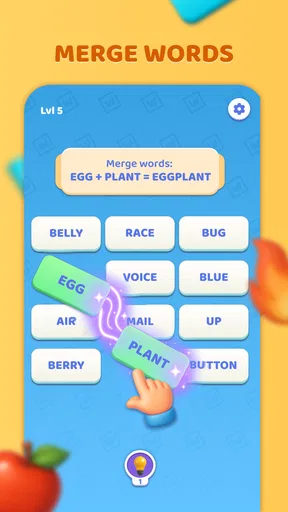
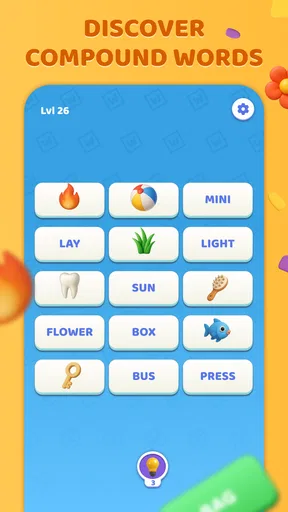

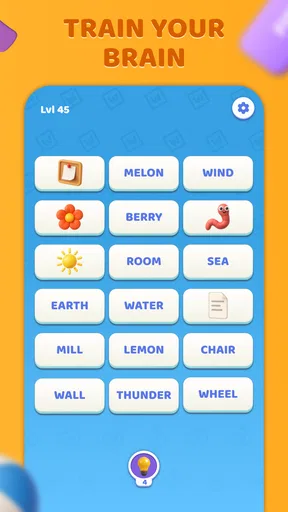
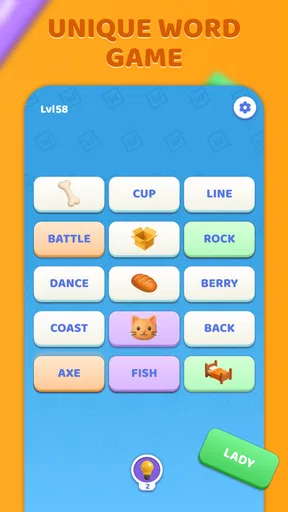
 Analysis by AppCompare
I judge a word puzzle by what it asks me to do in the first few minutes and whether I want to return after putting it down. Words Merge: Search Puzzle has a clear central appeal: it asks you to look for connections between letters and words, then gives that familiar word-game activity a logic-puzzle flavor. I find that combination best suited to short breaks, when I want something more involving than scrolling but don’t want to commit to a long game session.
It is a free word game from MCZ Apps developer, currently at version 1.4.0, and it has an Everyone age rating. The game has a 4.4 average from around 33 ratings and more than 10,000 installs. Those figures suggest that it has found an audience, though I would treat them as a small snapshot rather than proof that every player will enjoy its pace or puzzle style.
Where the game stands now
The basic attraction is easy to understand: this is not just a matter of spotting a word in a conventional straight line of letters. The idea of joining words and making logical connections gives the search a more deliberate feel. I like that distinction, because it encourages me to pause and test possible relationships instead of sweeping my eyes over a grid and hoping a familiar word jumps out.
That makes the game a reasonable choice for someone who enjoys word searches but sometimes finds them too predictable. It still belongs to the approachable end of puzzle gaming, rather than demanding specialist knowledge or a long tutorial. The appeal is in noticing patterns and making a sequence of small decisions; the challenge is keeping several possibilities in mind without turning a relaxing round into work.
What its version and launch tell me
The current version is 1.4.0, and the game was released on July 23, 2025. That gives a useful point of reference for anyone deciding whether to start now: the version number shows that the app has moved beyond its first release, but it does not by itself tell me what changed or how extensive those changes were. I would not read a version label as a promise of new modes or a particular update schedule.
For an existing player, the practical question is whether the current build continues to feel clear and comfortable during ordinary play. I would focus on whether the puzzle rules remain easy to follow, whether the difficulty feels fair, and whether a session is enjoyable without needing to consult instructions repeatedly. Those are better tests of the game’s present state than assuming that a higher version number automatically means a major redesign.
How I would fit it into a day
I can see myself opening it while waiting for a ride or taking a quiet break between tasks. In that setting, a puzzle that calls for attention but not a complicated setup is a good fit. I would start with one round rather than treating it as a game I need to play for an hour: the word-linking idea is most enjoyable when I can concentrate, try a few options, and stop once my break is over.
Worth Reading Before You Choose

Flipboard Shows What News Apps Must Do Beyond the Feed

Switching to Android Auto Means Rethinking Your Driving Routine

Google Calendar Makes a Crowded Week Easier to Manage

Ludo King Makes the Most of the Minutes Between Plans

Baby Panda World Brings Quick Play to Modern Phones, but Its Game Library Feels Busy

ESPN’s Live Game View Makes Following Close Games Easier
A useful habit is to look for the simplest connection first instead of chasing every possible word in the grid. If I get stuck, I would step back and scan the letters again with a different starting point before using a hint. That small reset can help me spot a route I overlooked, and it also makes any hint feel like a last nudge rather than the main way I make progress.
Who will get the most from it
I would recommend it to people who like vocabulary puzzles, enjoy spotting patterns, and want a light game they can pick up without a large time commitment. It may also suit a family looking for an accessible word activity, especially given its Everyone rating. That rating is about age suitability, not a guarantee that every child will find the puzzles easy, so I would still let a younger player try a round and see whether the rules click.
On the other hand, I would look elsewhere if I wanted a traditional crossword with written clues, a competitive word game built around playing against another person, or a deep narrative puzzle that changes the rules as it goes. The appeal here is more focused: connect and search, then work through the logic of the puzzle. Players who dislike visual scanning or prefer answers to come from definitions may find that central task less satisfying.
First Impressions
Right off the bat, Words Merge: Search Puzzle greets you with a sleek and user-friendly interface. The colors are easy on the eyes, and everything is laid out in a way that even a first-time user won’t find intimidating. Navigating through the app is a breeze, and that’s a massive plus in my book. You won’t find yourself fumbling through endless options or menus. Instead, you’re just a tap away from diving into your first puzzle.
The Gameplay Experience
Now, let’s talk gameplay. The concept is pretty straightforward, but don’t let that fool you—this game packs quite the punch. You’re given a grid of letters, and the challenge is to find words by merging adjacent letters. It’s like a word search on steroids, but with a twist that keeps you engaged longer than you’d expect. As you progress, the puzzles get trickier, demanding a keen eye and a sharp mind. Trust me, it’s addictive!
One of the things I absolutely love about this game is its ability to adapt to your skill level. It starts off easy, but as your skills improve, so does the complexity of the puzzles. There are different levels to unlock, and each one offers a fresh set of challenges. It’s like having a gym for your brain, but without the sweat and the smell of old socks. Plus, the satisfaction you get from completing a particularly tough puzzle is a reward in itself.
Features That Stand Out
Let’s dive into some of the features that make Words Merge: Search Puzzle a standout. First up, there’s the hint system. Got stuck on a particularly tricky word? No worries! The app offers hints to nudge you in the right direction. It’s like having a friend whispering clues in your ear, which is super helpful when your brain hits a wall.
The game also boasts a daily challenge feature. Every day, you get a new puzzle to solve, and these aren’t your run-of-the-mill puzzles. They’re designed to test even the most seasoned wordsmiths. It’s a fantastic way to keep the game fresh and exciting, giving you a reason to come back every day.
Playing with a light touch
Hints are most useful when I have already tried a couple of reasonable paths and can’t tell which direction makes sense. I would avoid tapping one as soon as a puzzle feels difficult: working through a few alternatives first is part of the satisfaction, and it helps me learn how the game expects connections to be made. If I am playing with a child or a less confident word-game fan, though, a hint can keep a round from turning into frustration.
The daily challenge, as described in the game, gives returning players a reason to make a puzzle part of a routine. I would treat it as an optional check-in rather than a streak I have to protect. That makes the game easier to enjoy on busy days, when I might have time for one puzzle but not want another obligation competing for my attention.
How it compares with other word puzzles
Compared with a standard word search, the merging idea asks for more active reasoning: I am not only scanning for a familiar spelling, but considering which letters or words can sensibly connect. Compared with a crossword, it is less about interpreting a written clue and retrieving a specific answer from memory. That makes it a useful middle ground for players who want more thought than a simple search but do not want clue-heavy solving.
It is also a different kind of break from a head-to-head word game. If I want a social contest or a tactical back-and-forth with an opponent, I would choose a game designed around that. Here, the attraction is a personal puzzle and the chance to improve my own eye for patterns. That solo focus is a strength when I want quiet, but a limitation if competition is what keeps me engaged.
Small choices that improve a session
When I reach a dead end, I find it helpful to change the way I scan rather than stare harder at the same letters. I might start from a different corner, look for short connecting possibilities, or pause briefly and return with fresh eyes. This is especially useful on a small phone screen, where repeatedly tracing the same route can make the grid feel more confusing than it is.
I would also keep sessions deliberately short when playing between errands or during a commute. The game’s word-and-logic focus rewards attention, so it is not ideal when I need to watch for announcements, navigate a busy place, or split my focus constantly. It works better in a calm waiting room or at home than while walking or doing another task that needs my eyes.
What to expect from the current build
Because the release date and version identify a particular point in the game’s life, I would use them as context rather than as a forecast. A player arriving now can judge the current experience on its own merits; someone returning after time away can check whether the puzzles and interface still feel familiar. If future releases alter the balance or presentation, that will be worth evaluating when it happens, not assuming in advance.
The game has a 4.4 average and a modest review count, so I would read the overall response as encouraging but not definitive. Puzzle preferences are personal: one player may enjoy the gradual increase in difficulty, while another may want more variety in how each round works. I would decide based on whether the core task of linking and finding words is the sort of thinking I enjoy.
Visuals and Sound
On the visual front, the game is a treat. The graphics are clean and vibrant, making it easy to distinguish between letters and words. There’s a nice variety in the backgrounds, which adds a bit of flair without being distracting. As for the sound, it’s relaxing and perfectly complements the gameplay. The subtle audio cues when you find a word are rewarding and satisfying, without being overbearing.
Community and Connectivity
Another aspect I appreciate is the sense of community. The app connects you with other players globally, allowing you to compare scores or even compete in friendly matches. It’s a neat way to add a social aspect to what is essentially a solo game. Plus, there’s something quite motivating about seeing your name climb up the leaderboard.
Choosing it for the right reason
If you are deciding whether to try it, I would start with the central question: do you enjoy finding patterns in letters more than answering clues or racing another player? If yes, the game’s word-search and logic blend is a sensible place to spend a few spare minutes. If you prefer an open-ended vocabulary challenge, a head-to-head contest, or puzzles built around detailed clues, a different word game is likely to suit you better.
For a casual player, the free price removes the need to make a purchase decision before trying the basic experience. I would still choose a quiet moment for the first session, so I can understand the rules without distraction and see whether the puzzle style holds my attention. The best recommendation I can give is a practical one: try a short round, notice whether you enjoy the process of connecting possibilities, and decide from that rather than from the genre label alone.
Final Thoughts
All in all, Words Merge: Search Puzzle is a fantastic way to unwind while giving your brain a much-needed workout. Whether you’re a word game aficionado or just someone looking for a new way to pass the time, this app is well worth downloading. It’s engaging, challenging, and most importantly, fun. So, if you haven’t already, give it a go. Your brain will thank you!
Happy puzzling!
Pros
- Engaging and challenging gameplay.
- Variety of difficulty levels available.
- Visually appealing design.
- No intrusive ads interrupting play.
- Regular updates with new puzzles.
Cons
- Limited hints can be frustrating.
- No multiplayer or online mode.
- Requires internet for updates.
- Lacks theme customization options.
- Can become repetitive over time.
FAQs for Words Merge: Search Puzzle
What is Words Merge: Search Puzzle?
Words Merge: Search Puzzle is an engaging word game that challenges players to find and merge words hidden within a grid. The goal is to connect letters to form words, which then disappear to create new opportunities for further word formation. It's perfect for fans of word puzzles and brain teasers.
Is Words Merge: Search Puzzle free to play?
Yes, Words Merge: Search Puzzle is free to download and play. However, like many mobile games, it offers in-app purchases for hints, additional levels, and other enhancements. These purchases are optional and the game can be fully enjoyed without spending any money.
What platforms is Words Merge: Search Puzzle available on?
Words Merge: Search Puzzle is available on both Android and iOS platforms. You can download it from the Google Play Store for Android devices and the Apple App Store for iOS devices. Ensure your device meets the app's requirements for optimal performance.
Does Words Merge: Search Puzzle require an internet connection?
No, Words Merge: Search Puzzle does not require a constant internet connection. You can enjoy the game offline, making it a great option for playing on the go or in areas with limited connectivity. However, certain features like in-app purchases might need an internet connection.
Are there any ads in Words Merge: Search Puzzle?
Yes, Words Merge: Search Puzzle contains ads that appear between levels or while accessing certain features. These ads help keep the game free for players. You may have the option to remove ads through an in-app purchase if you prefer an uninterrupted playing experience.


